Pages

Wednesday, June 19, 2013

How To Create A Text File on the Command line in Windows?

Just follow these simple steps:

1. Open the Command Prompt / Terminal
2. Type the command in the following format :
          Editor fileName.fileExtension

As shown in the example on Figure 1 below, we used Notepad as text editor. So we came up with the command :

          notepad test.txt    


Figure 1


3. Press the Enter key.
  

Figure 2


4. You'll be shown with a popup message asking you if you want to create a new file. Just click "Yes" and you're done!


Figure 3

Friday, May 31, 2013

Conquering FEAR - More fun in the Philippines!


According to Wikipedia, Fear is an emotion induced by a perceived threat which causes entities to quickly pull far away from it and usually hide. It is a basic survival mechanism occurring in response to a specific stimulus, such as pain or the threat of danger.

We have fears - or at least most of us. Many people recognize their fears by just thinking about it; while some don't realize what their fears are until they're dragged into certain situations. Commonly, people are scared of heights, dark places, monsters and many other things.

Most recently, I've been into an adventure that I'd never thought I'd be able to experience my entire life. From hanging on the zipline, horseback-riding, wake boarding and driving ATVs on rough roads... I felt invisible!


I must say, after the experience, I really had a lot of muscle pains! It felt like I was beaten by a hundred people. I could hardly move my arms and legs. Nevertheless, it was ALL WORTH IT! To be honest, if I would be given another chance to experience this kind of adventure... in a heartbeat, I'm pretty much very willing to go through the same struggles and pain that I had. For what it's worth, I would care less about those things and focus on the fun and the once-in-a-lifetime experience that I'm getting in every activity!


In addition, I would like to express my sincerest gratitude to my company Drumbi Global / DNA Micro Outsourcing, Inc. for the opportunity to get indulged into the ultimate adventure that I've ever had so far.

Thank you as well to the owner and developer of Danasan Eco Adventure Park for creating such a great place for leisure and adventure especially for sports enthusiasts like myself!


Thursday, December 13, 2012

Reproductive Health Bill in the Philippines


I'm an active and a proud Roman Catholic...and I clearly understand what the church's notion about the Reproductive Health Bill or as popularized as the RHBill and I acknowledge and respect that.

However, I believe that the RHBill DOES NOT PROMOTE PREMARITAL SEX NOR ABORTION, but only recognizes that we are HUMANS. We are vulnerable to committing mistakes - and it is not a secret to all of us that a lot of Filipinos especially teenagers engage into coitus at a very young age that leads to unwanted pregnancies, through which in a number of cases, leads to abortion and even suicide. It's hard to say this, but I must admit that in a very long period of time, the church has failed to teach the "Morality" that you are talking about. Yes, they've done their very best, but just like the song, their best wasn't good enough to stop the population explosion - which is associated to poverty; nor the rising number of sexually transmitted diseases among individuals; deaths of women especially mothers; abortions and suicides due to unwanted pregnancies, and stop the growling stomaches of those poor children who are more dead than they are alive because they aren't fortunate to eat at least once a day.

You must have heard as well that most families with the most number of children come from those who aren't earning enough to feed for their stomaches? Every time I see kids asking for a few coins in the streets, I shed a tear. I'm not from a well-off family. I have a decent job, but even I myself is having trouble providing myself to make it through each day of my life, how much difficult could it be for them?

Filipinos, wake up. You're in the 21st century - there's no turning back. These problems do exist now and we need to act on it - and FAST! We need to move if we all want to survive. So, think about it.

If parents of today would plan their family responsibly, they could be able to provide for enough food for their children and send them all to school, there would be enough rooms for everyone in getting a job because the population is enough; we would have healthier women - far from cancer or pregnancy complications; as for premarital sex...this one's a cliche...but a cliche isn't a cliche if it doesn't work - "An ounce of prevention is always better than a pound of cure". They have already committed a "sin" by violating Chastity, but let's not make them commit another mistake - let's educate them and prevent them from getting into more trouble in life.

I am PRO-LIFE. By LIFE, I mean a life that has meaning. A life that everyone has something to eat. A life for parents who can be happy seeing their children go to school. A life for individuals to stay rich - in HEALTH. A country which can provide enough resources for all its citizens.

There's no assurance that life has no suffering, but at least, one thing's for sure - we won't suffer from hunger, we could prevent suffering from sexually transmitted diseases, we could avoid teenagers to suffer from bearing an unwanted child while growing up, and we could prevent and aid women and our mothers from suffering from cancer and other illnesses.

Having said all these, I believe that it doesn't make me a less Christian if I say #YesToRHBill.

Wednesday, October 31, 2012

How to Create a Custom Disk Image for Your Mac App Installer

I have always envied a lot of applications for having such professional-looking installers. I am a newbie developer myself and for the past 24 hours, I've been knocking my head off just to create a custom disk image for my own apps.

So, I went to Google and asked for help. I looked for any tutorial that would might be a possible help; I've read every discussion that talks about creating dmg installers; and... I've surfed for any free application that would somehow help me with this dilemma. I've downloaded a few free applications. The worse thing that came to me was installing those apps which aren't even capable of doing what I was really looking for. They require registrations and payments for the features that I needed. Of course, I wasn't going for that.

I almost gave up. Honestly, I even attempted to look for some cracked serial numbers, just to avoid the registrations and the payments, whatsoever. Yes, I did found a few - but they are no longer usable for me, anymore. I realized that there might be some other way - than committing piracy. So, I looked and looked for some more tutorials, until finally...I found one! This site Mac101 gave me the whole idea of creating a disk image without even using those freakin' apps.

I have been using Disk Utility ever since I started developing for Mac OSx. I didn't realize that I don't need to have some paid applications just to create my fancy app installer! I felt like an idiot, back there.

Now, after I've successfully created my Mac application dmg installer, I just thought of sharing the knowledge that I've learned to others. There might be some developers out there who also had the same experiences as I did. This would perhaps help them as well.

Just follow these simple steps and you're good to go!

1. Create your own customized background.
    My example isn't that great, but you get the picture. :)


2. Open Disk Utility and create a new disk image file.
    Click on "New Image" from the toolbar (encircled) to create.


After clicking, you will be prompted with the saving options. I have labeled only the basic ones for you, just for the purposes of this discussion.


3. Drag your background image to your mounted disk image.
    You can put it anywhere inside the disk image.


4. Create an alias for your background image.
    Just right-click and select "Make Alias". Just so you know, an alias is equivalent to a short cut in Windows.


5. Open the Terminal window.
    Then type "defaults write com.apple.Finder AppleShowAllFiles -bool true" and hit Enter/Return key of your keyboard. If the bool value is true, that means all hidden files will be shown.


6. Restart Finder.
    You can do this by typing "killall Finder" in the Terminal window or by selecting Finder in the Force Quit Applications window and click on "Relaunch".


7. Set the dmg background.
    Click on the background image alias. Press Command + J keys on the keyboard in order to show the View Options popup window (right). At the bottom, you can see the Background options - select Picture. Then, drag your background image to the space provided (encircled bottom-right). You can set the size of the dmg window, as well as the icon size, text size and others. Just do some experiments afterwards. :)


The invisible files like ".Trashes", ".fseventsd", and ".DS_Store" can now be seen.


8. Hide your background image.
    In order to hide your background image icon from the dmg window, rename it by just adding a dot (.) at the beginning of the file name. In this example, change "background" to ".background" and hit the Return key. A warning prompt message will be shown - just click OK. Adding the dot to the file name will let the system treat the file as invisible. You will notice that the image will have a decreased level of opacity on its image.


The background is now successfully customized.


9. Delete the background image alias.
    Simply right-click, then select "Move to Trash".


10. Hide the invisible files.
      Open the Terminal again and type "write com.apple.Finder AppleShowAllFiles -bool false". Yes, it's the same script as showing the invisible files - just change the bool value to false. Don't forget to type "killall Finder" to restart Finder.


11. Add your application file/s to the dmg file.
      If your application uses some third party libraries and other files, you can add them all here.


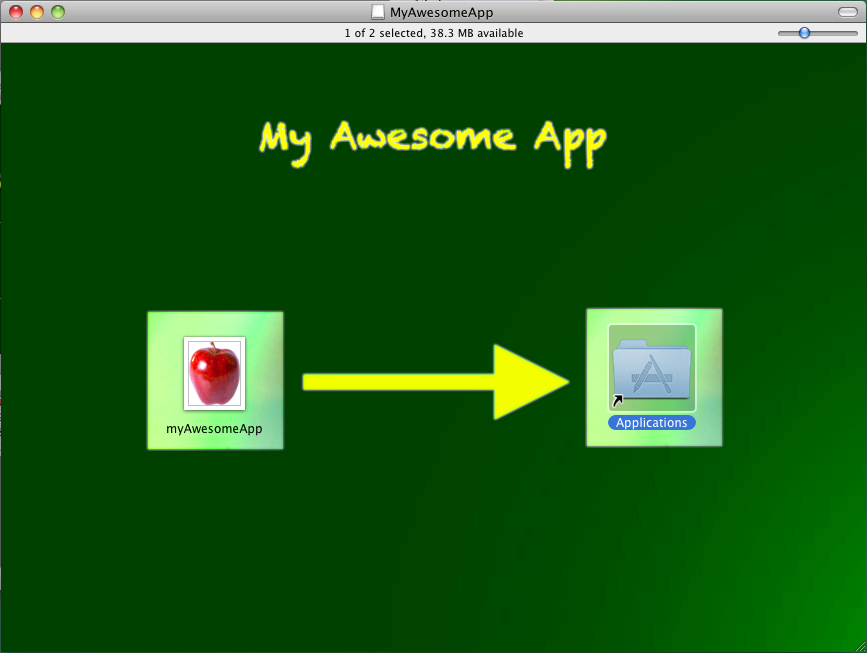
12. Create an alias for the Applications folder.
      Open Finder. Go to System Disk and look for the Applications Folder. Right-click and select "Make Alias".


Drag the Applications alias that you have created to the dmg file as shown below.


The next step is often forgotten. If you are one of those who are concerned about the file size of your app installer. Right-click on the dmg file of your app installer and select "Get Info" to see the file size.
Knowing the file size - why is it important?
For starters, perhaps, the smaller the size, the better. It can be easily downloaded, saves time and space.

If you remember when we first setup the size of your app's disk image, we initially put 40MB (the dropdown options depends on the version of your OS and the required file size for your app is also a factor). So, what do we do, in order to slash extra spaces and freeing those spaces that the installer don't even need.


13. Convert the dmg file to compress its file size.
      Open Disk Utility again and look for your app installer's dmg file. Right-click and select "Convert <your app's name.dmg>".


Set the file name. You can actually retain the file name of your disk image or make a new one. Save the file to any directory you want.


As you can see, the file size shrunk into 1MB. That gives you 40MBs of memory saved.


Open the compressed dmg file and you're done!


Sorry about my images, they're a bit crappy. I promise to edit these as soon as I can.
Nonetheless, I hope this helped you out on your project. Just let me know if you encountered any problem. If you have some ideas to share, feel free to post your insights. :)

Monday, March 5, 2012

How to view hidden files in Mac?

Viewing hidden files allows you to access hidden UNIX directories or for recovering files such as Music from an iPod. Moreover, by prefixing the name of a folder with a "." (dot), you can create a folder that is hidden from prying eyes.

To view hidden folders:
  1. Open the Terminal Window (located in /Applications/Utilities)
  2. At the command prompt, type the following:

      defaults write com.apple.Finder AppleShowAllFiles -bool true    
  3. Press return (enter) to execute the command.
  4. For the changes to take effect, either log-out or log back in again, or relaunch Finder (this can be done from the Force Quit Window or by typing "killall Finder" in the Terminal window).


To hide the folders:
  1. Open the Terminal Window
  2. At the command prompt, type the following:

      defaults write com.apple.Finder AppleShowAllFiles -bool false    
  3. Press return (enter) to execute the command.
  4. Log-out or log back in again, or relaunch Finder (as discussed above).


~ Hope that helps! :)

Friday, February 3, 2012

Welcome to the world, Baby Kim!

It all started in August 24, 1989...
This was the day everyone has ever waited for. On this very day, a family was about to be complete.

Rowena Zamora Punay, gave birth of their first baby. She was fully supported by her husband, Arturo Wagas Punay. Rowena had a hard time during the delivery. However, on the other side of the room, lies a very excited father-to-be, Arturo. There was no place to put his emotions.

Upon hearing a baby crying out loud, tears beneath the smiles are seen. It was one of the toughest, yet the happiest moment of their lives. At last, the gift they have waited for had arrived. August 24, 1989, the day that they've been officially called "Mama Wenie" and "Papa Turo".

Thursday, June 23, 2011

Go Green Baguio City


Baguio City - the Summer Capital of the Philippines. Blessed with a very fine cool whether, situated on top of the mountainous areas of the Cordillera Administrative Region, abundance on green nature isn't a surprise. The city is filled with trees and flowering plants wherever you go. For years, the residents have been living in an Eco-friendly society. That is why Baguio stays as a Paradise City.

Visit Baguio City and experience paradise in nature within your reach! 

Free To Move Like Miley Cyrus

Miley Cyrus Gypsy Concert Tour
Maninal, Philippines - The Only Stop in Asia
June 17, 2011 - it's a date! I could never ever forget this day.

For the past twenty-one (21) years of my life, I've never won any contest which requires what they call "luck". Raffle draws, lotto, bingo and the like are a bunch of jokes for me. I always come out as a participant - never a winner. Until a day came when I got a glimpse on a news on the internet - Wanna Watch Miley Cyrus Concert in Manila For Free? Find Out How!

Well, as long as you're a female and you got to show your "Free-to-move like Miley" in a photo. Yes! A photo indeed that would land thirty (30) girls to the SM Mall of Asia Concert Grounds to experience the Miley Cyrus Gypsy Heart Tour! Nine (9) girls will each win two (2) Gold Tickets, one (1) with three Silver Tickets, another nine (9) girls take home two Silver Tickets each, and eleven (11) young ladies bag two (2) Bronze Tickets to the concert. Then I said, "Great! Just great! My chances are...eeennnnkkk! Zeeerrooo!!!"

Then, I still gave my shot on it. I guess my boredom got my hands drag and click those pics and submit them! I believe, I sent around six (6) or seven (7) photos? Good thing they didn't limit the number of entries per participant. :) As long as the pic is not edited and not repeatedly sent. After sending my entries, I was back to my old stuffs at work. I was in Iligan City at that time. After I've done my work there, I went back to Cebu City. I'm back to the ball game, they say. I was too busy to think about the contest.

Due to work necessities, my boss asked me to go to Baguio City. Just days after I arrived in the Summer Capital of the Philippines, surprisingly, I received a text message from an unregistered mobile number. I quote, "Hi good morning :) was wondering if u got my msg yday informing u abt ur miley cyrus tickets for tonight :) pls reply w ur full name n confirmation", off quote. I said, "Oh....whaaat??!!! I won??? How??? Oh...I remember, the photo thingy! :) Yey!" Then what? I'm in Baguio City! Approximately 7 hours away from Metro Manila. How am I going to get there on time?! I was also on-duty that day. I wasn't even sure if it isn't another internet spam on contests.

More so, I followed my instincts that it isn't a spam. I mean, why should that person send me a text message such as that? I also checked my e-mail - and there it was. I saw the confirmation message that I won two Bronze Tickets for Miley's concert! 

However, to make sure I won't be another hopeful winner victim of a stupid internet spam, so I made a little research. Actually, I eyed hardly on the net to check if the contest is legitimate and true. After which, I was satisfied with what I've read - so I called my boss and I told her that I'll be going to Metro Manila to watch Miley Cyrus' only stop in Asia concert. Haha...I know it was unethical of me and definitely it was an inappropriate excuse of leaving work, but I just took a shot at it - she okayed! Also, since I won two tickets, I called my office mate to come and watch the concert with me!

I'm just KIDding! This is my winning pic in Whisper's
"Free To Move Like Miley" Photo Contest.
I ran into my room to get myself ready. It's a seven-hour trip girl, you have to get to the bus as early as possible! I didn't bring anything aside from my shoulder bag, my cellphones, pocket money, and a camera! :) Thank God, I didn't delete the sender of the text message. I contacted her and asked her to wait for me because I'll be super late! If I didn't, the cut-off time for winners to claim their tickets is up to 6:00PM only and the concert starts at 8:00PM. Oh...em...geeehhh!!! My adrenaline is on the rush! Breathe kimmy...breathe!!!

As soon as I arrived at the bus terminal, immediately, I called a taxi and rushed in to SM Mall of Asia! It was my first time to visit such big mall. I had to ask several guards to get to the concert grounds. Thanks guys! You're a big help indeed. :) 

We got the tickets just minutes before the show started. There, we jammed with pop icon and international artist Miley Cyrus. It was extremely explosive and we enjoyed it a lot! I don't regret going down to Manila all the way from Baguio just to watch Miley's concert. I really had fun indeed!!!

Thank God for the opportunity. Thanks to my boss for allowing me to skip my duty for "some annoying concert" for others. Also, I wanna thank the girl from Whisper Philippines who waited for me to get those tickets. I didn't even get her name. Thanks anyway! :) Thanks also to Irene Reyes for being such a good company during the concert.

If you want to see the post, just follow this link: http://showbiznest.blogspot.com/2011/06/wanna-watch-miley-cyrus-in-manila_11.html.
You can also see my winning photo #25 through this link: http://ph.omg.yahoo.com/photos/lucky-fans-win-miley-cyrus-tickets-slideshow/.

Monday, December 20, 2010

A Granddaughter's Scar

Ate Kim-Kim and Lolo Paping.
This is the only and the last photo that
I've ever had with my Lolo.
October 22, 2008 at around 6:30PM, my grandfather Pablo "Paping" Gabito Punay had his last breath. The room was filled with silence. Tears fell. Me? I wasn't there. Probably, I was still 20-30 Km away.

It was the worst day for all of us. The worst for me. Horrible if I must say. I never had the chance to say what I got to say to my Lolo. All he ever did was to do the best for all of us - his children, grandchildren, and whoever comes to him and ask for his help. He was the BEST, definitely.

That day was the worst day of my life. The bus I was riding had blown off its tire. It took a long while before the driver and his assistant could fix it. I just sat inside the bus, waiting...while my Lolo is having a very hard time catching his breath.

By the time I arrived home, I threw all my bags and walked immediately to my Lolo's house with my mother and sister. I don't even remember saying "Hi" to them.

When we reached my Lolo's house, everyone was calm. My Lolo was laid down on his bed. Believe it or not, when I came to his side, I didn't even know that he already passed away. I sat beside him and touched his hair. All I could say was, "Lo" with a smile on my face. For that moment, I was indeed happy; for a very long time of waiting to see my Lolo, at last! I'm with the greatest grandfather in the whole world!

I watched him for a moment. I waited for him to take a breath. My cousin have told me before that his breathing interval takes longer; and so I waited.  However, after a while I noticed, he really wasn't breathing at all. Then, from a distance, I heard my uncle saying "Around 6:30 PM..."

I sat still. No tear came from my eyes. I don't know how to react to the news I've heard. I realized he was cold and lifeless. Then I said, "Lo, why didn't you wait for me...?". I was very disappointed and so I went to the other house. There sat my father and my aunt. They were both crying. I had to control myself not to shed tears. I don't know what I was thinking that time. All I know was, I had to be strong. My heart felt like being torn to pieces. I could hardly believe that my Lolo is really gone and it's my fault why I haven't said "Goodbye" to him. I went out because I felt like I'm out of air. I couldn't breath.

Just days before, I asked God to give me a chance to bid goodbye to my Lolo before he dies. I asked him to let my Lolo live until Wednesday (October 22, 2008). Yes, he did gave me that chance; however, I didn't go home as early as possible. I was supposed to take a ride home that morning before he passed away. But I didn't. I waited for my cousin, Charisse. We agreed to go home together after she gets enrolled. But I guess fate wasn't with us. She failed to enroll earlier than we thought she would have. She wasn't even able to enroll on that day. There were technical problems with her school's enrollment system. So, I decided to go ahead. To my luck, the bus' tire got blown off in front of ABS-CBN.

I didn't know what to think; but no matter how I try to see the brighter side, I couldn't stop myself from thinking..."What if I had left earlier?"... I could have hugged my Lolo and tell him how much I love him. I could have told him how thankful and lucky I am to be his granddaughter. All I can say is "I could have...". I could have said sorry.

I failed my Lolo, I failed God, and I failed myself. It was all me. It was all my fault. Because of my stupid decisions, my Lolo left without hearing a word from me. I really hate myself for what happened. Until now, I couldn't find peace of mind because the memory of my failed actions. God, please help me get over with this.

This Christmas is the second season to celebrate without our Lolo. It could have been better if he's still with us. I guess we just have to get used to it because no matter what we do, he's never coming back.

We love you Lo. I'm missing you so much already. I missed your old stories during World War II. Even if you just keep on repeating every scene, I've always enjoyed listening to your stories - as long as I'm with you.

You're not just a soldier to the Filipino people Lo.You are my hero, our hero. You'll always be the best Lolo in the whole wide world. Wherever you are, I pray only happiness and peace for you. I love you. May God be with you always!!!